Showing posts with label Apps. Show all posts

Sunday, January 11, 2015

Incorporating iPads and Beginning Math Centers, Plus Apps

photo of iPads wolfelicious

Monday was our first day back after Christmas Break.  I was excited to start incorporating everything I decided to try after break; however I was sad not to be able to spend the whole day with my boys.

photo of iPads wolfelicious

Since I was so lucky to get a class set of mini iPads I knew I wanted to start incorporating them into our day.  After researching and trying to figure out what would be best for my class, we started Monday using them.

photo of iPads wolfelicious

I thought one of the easiest ways to incorporate them was using them for making words.  We always used our dry-erase boards to write out words with our spelling pattern, but using the Magnetic Letters App made it different and more exciting!  The kiddos loved changing the background and the letter colors.
The kiddos were 100% engaged with making words!  We also used the app Show Me to write some words using a stylist.  Unfortunately, the stylists were not working very well with our covers.  Instead some used the stylists and some used their finger.  Both ways the kiddos loved word work!!


This week I started my mission of incorporating guided math into my day.  I thought it was a perfect time to switch since we are just coming back from break and the following week is crazy because of the short week and half days due to the end of the quarter. 

On the first couple of days of the week, I was still printing and laminating some of the items I needed for my new math centers.  I wanted to start the process of teaching my kids what to do even though I wasn't completely prepared.  I decided to put the kiddos into different groups so they would get some practice at math centers.  Since I didn't have everything prepared yet, I just used what I could to do this.  

Here is a break down:
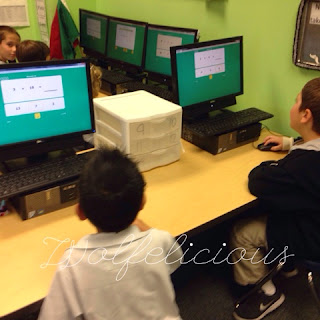
1} Teacher Center - worksheet from basal
2} Computers- Math Facts in a Flash (our school purchases this every year)
Photo of Math Centers Wolfelicious
3} iPad- Teach Me First Grade
 I love this app.  It works on sight words, handwriting, addition, and subtraction.  It keeps track of the student's progress and the students earn stickers.
4} iPad- Smart Cookie Math
This app is wonderful!  It works on addition and subtraction fluency.  A Common Core standard!  I use this to help with our Smart Cookie Math program.
5} iPad- My Piggy Bank
This app is such a fun way to practice money.  My students kept asking to play this.  I ended up purchasing the full version because of how excited my kids were to play this. 


On Tuesday and Wednesday I continued these math centers.  I showed them how I wanted them to clean up and then stand once they were ready to switch.

Thursday I had the Math Chart prepared to share with the kiddos.  I showed them how to use the chart to know where to go.  We practice using the chart on Thursday with the previous centers.

Then on Friday I had everything ready and prepared for the math centers I really want to use. (Thanks to my intern for helping me get all prepared for this adventure).


Here is a list of what my kiddos are really going to do for Guided Math:
1} Teacher Center - worksheet from basal
                                     Photo of Math Centers Wolfelicious
2} Computers- Math Facts in a Flash (our school purchases this every year), some weeks students will work on Xtramath.
3} iPads- Various Apps 
4} Math Notebook
Photo of Math Centers Wolfelicious
5} Math Tubs- On Friday, I went over two of the Math tubs the students will have a choice that they could do during their tub center.  I plan on introducing the other ones on Monday.
Photo of Math Centers Wolfelicious

It was so exciting seeing my vision of these math centers play     out.  I saw that the students were excited about math and completely engaged in what they were doing.  I know over time this extra effort into math will have a big pay out.  My students will definitely master what they need to for first grade!

Have a Wolfelicious day!

Check out my TPT Store
     Pre-K, Kindergarten, First, Second, Third, Fourth, Fifth, Sixth, Seventh, Eighth, Ninth, Tenth, Eleventh, Twelfth, Higher Education, Adult Education, Homeschooler, Staff - TeachersPayTeachers.com


Wednesday, June 26, 2013

iWant Websites

I am linking up with Tales from Outside the Classroom for Website Wednesday.
  

I know I always like to use fun, engaging websites during center time in my classroom.  I always love finding out about new websites to use.  I have a couple that I use or plan to use next year.


The first one up is Starfall.  I am sure everyone already knows about this wonderful site.  My kindergarteners LOVE this site.  They always look forward to computer time.  What I love about Starfall is that there are games on the site that have to do with the seasons.  My kiddos always love to complete the snowman activity.  I think that is the closest they get to actually putting a real snowman together since we live in Florida. LOL. I feel that Starfall has so many activities that the kiddos never get sick of doing them.  If you haven't checked out Starfall, you need to.  Wait till after you finish this blog and then go. :) 


The next one I am considering for next year is ABCMouse.com.  I have heard the commercials and how they say how wonderful it is.  I have been very skeptical of it so I decided I would download the app for my son and try the 30 day trail.  I hate that you have to pay for it but I thought if it was so awesome like they say it is that it would be valuable for my son to do.  I downloaded it about 2 weeks ago.  So far I am impressed.  It has tons (I mean tons) of activities.  My son seems to be enjoying all the activities.  He actually just figured out that you can exchange your tickets and buy things for your room (the room on the app, not your actual room).  It is a great incentive for children to keep playing so they can add more to their room.   He is loving the activities.  There is a great variety so it keeps him interested.  The one thing I would like to see fixed is some of the activities don't work so well on the iPad.  I wrote them and they said they are working on it.  The only other downfall that I think there is, is that it has been difficult to figure out where to start my son.  I think they maybe need a pre-test so you know your child is being pushed and on the best level for them.  I have my son on level 5 right now.  I started him on an easier level but it was way too easy.  I think level 5 may be too easy too but he is only 6% through it so I hope it becomes harder for him.  Overall, I do think it is a great website.  Will I purchase it when the trial is up?  I am not for sure yet.  If my child stays interested like he has been in it, then yes I will.  I do think it is a good website overall.  I need to look into it further because I heard it is free for schools.  If I can get it for my classroom, I will definitely do that.  I will have to do more research on it. 

Next, I would like to show you a new app that I was asked to check out.  It is called Counting Together.
 This app teaches kids "subitizing" and addition.  Both concepts are part of the Common Core Standards!!!

This app has multiple levels and allows multiple players.  What??  Yes, multiple players can play at the same time.  Great for centers!!  Each student (up to 4) would have a side of the iPad.  The students race each other and the clock to count and match the number.  The number could go up to 10. (Free version)

Since it is summer break I couldn't try it out with my class, so instead I had my 4 year old son play with me.  He loved the graphics at the beginning of the app.  He got a little frustrated when each round got faster and faster, however he was doing great for never learning this concept before.  He was able to do the lower numbers very well.  I think the timer would just help him be able to get the concept faster the more we played the game.

I think this app would be an asset to a kindergarten or even first grade classroom.  This app is going to help the students know their addition facts fluently (Common Core).   I do think this concept is difficult so having a fun way to help teach it is wonderful!  I will definitely be using it next year.


Have you used any of these sites?  What do you think about them?  What is on your list for classroom websites?


Kindergarten, 2nd - Reading, Education - TeachersPayTeachers.com


Tuesday, January 3, 2012

Apps on my iPad

 Apps on my iPad.
These are the Apps that I have on my iPads.  I have folders set up to help organize them.  My tittles are Letters, Sight Words/Reading, Phonological Awareness, Math, Science/Social Studies, Books, Music, Friday Folder/Games, Mrs. Wolfe, and Productivity.  I set up all the iPads the same exact way making it easier for me and the students.  Here are my apps:

Letters
Alphabet Match-  Memory Game with letters. $1.99 
ABC Alphabet Phonics Touch- A letter is named and the student has to tap it.  FREE 
Alphabet Board- Handwriting practice (has D'Nealian). $1.99 
Starfall ABC's- Just like the ABC part on Starfall.com.  $2.99 
Montessori Matching Board- Match letters, shapes, and numbers. $.99  
Picture Dot to Dot Animals-  Trace numbers and/or letters in sequence. $1.99
ABC Magic- Learn sounds to letters.  FREE
ABC Song- Song plus other activities.  FREE
Letter Rip- Learn Letters. $1.99
ABC Match- Letters. FREE
I Know Phonics ABCs-  Letters, letters match, letter search. FREE
Meet the Vowels- Learn the vowels. FREE
ABC Go- Explore the word of letters, words, and vehicles. $1.99
ABC Maze Lite- Help the birdie catch the runaway letters. FREE
ABC Coloring Book- Color. FREE
iWriteWords- teaches handwriting. $2.99
Big Kid Life Vet- Letters, numbers, colors and shapes. FREE
Alien Buddies- Color, shape, letter and number identification. FREE


Sight Words/Reading
Sight Touch- Learn sight words by sight, touch, and sound. FREE
Play Sight Words- Sight words with 3 different games. FREE
Word Wall HD- Helps beginning readers learn to read and write. $.99
Little Speller Sight Words- Pull down letters to spell sight words. $.99 
Big Kid Life Fairy Princess- Practice story comprehension, plot, and setting. FREE
Super Why- Practice the alphabet, rhyming, spelling, writing and reading. $2.99


Phonological Awareness
Montessori Crosswords- phonic combinations. $1.99
ABC Phonics Rocks! Lite- Letter sections and word sections. FREE
Sentence Reading Magic- FREE
Phonics Vowels- Learn vowel sounds and letter combinations. $2.99
ABC Pocket Phonics-  Teaches sounds. $2.99
Little Speller- Three Letter Words- Pull down letters to spell words. $.99
Dora Rhyming- Rhyming, beginning, middle, and ending sounds. $1.99
First Words Sampler-  FREE
Phonics Silly Sentences- FREE
Sentence Reading Magic- FREE
Futaba- Multiplayer game that helps students learn words. FREE
K12 Timed Reading Practice- Practice Fluency $1.99
SoundSeeker- Letter sounds. $1.99
Spell Animals- FREE


Math
Montessori 123 Board- $.99
Shapes- FREE
Math Puppy- Add, subtract, multiply, divide. FREE
Flash to Pass- Timed problems for addition, subtraction, multiplication, division. FREE
Math Bingo- $.99
Counting Caterpillar- Counting $1.99
Montessori Numbers- Numbers $2.99
Touch Learn Numbers- FREE
Montessori 100 Board Lite- FREE
Number Match- Memory game with numbers. FREE
Clever Kids First Puzzles- Puzzles/strategies FREE
Big Kid Life Fire Fighter- Numbers, shapes, and symbols. FREE


Science/Social Studies 
iBloom- plant a seed and watch it grow. FREE
Compass- FREE
Space Image- FREE
Solar System-  Book about the Solar System $13.99
Google Earth- FREE
BrainPop- Feature Movie. FREE


Books
Three pigs- $.99
Green Eggs and Ham- $4.49
Dr. Seuss's ABC- $4.49
AlphaBELCH- Silly ABC story. $.99
Toy Story- FREE
The Cat in the Hat- $4.49
1 Fish 2 Fish- $3.99
Bob Books #1- $1.99
Seasame Books- FREE
Rhymes- $3.99
ABC Little Alphabet Book- FREE
Monster at the End of this Book- $3.99 
Meet Millie- FREE

 
Music
Pluto Piano- FREE
Virtuoso- FREE
Music Sparkle- FREE
Twinkle StarFREE


Friday Folder/Games
Angry Birds- $.99
Easy-Bake Cupcakes- FREE
SpongeMarble Lite- FREE
Tiny Pets- FREE
Snoopy's Fair- FREE
Hoops Free-  FREE
Creationary- FREE
3d Finger Soccer- FREE
Racing Penguin- FREE
DUPLO Jams- FREE
Draw 4 Free- FREE
Show Me- FREE
PBS Kids- FREE
LEGO Harry Potter- $4.99
Talking Tom 2- FREE
Talking News- FREE
Talking Gina- FREE
Teach Me Toddler- $.99


Mrs. Wolfe
KinderTown- Find the best children's apps. FREE 
Skype- Video Chat. FREE 
Facebook- FREE 
Pinterest- FREECalendar, Contacts, Notes, Maps, Videos, iTunes, Game Center, FaceTime, Camera, Photo Booth, Settings, Safari, Mail, Photos, Music, App Store


Productivity 
Messages, Reminders, iBooks
Quickoffice- $14.99
AllRecipes- FREE
CouponPolicy- $.99
SketchBookX- FREE
USA Today- FREE
Xfinity TV- FREE
SplashTop- $4.99
QRReader- FREE
Kindle- FREE


I searched and searched the internet for a cover I thought would be the best for my class to use.  I wanted a cover that covered the corners.  I also wanted to have a front cover so when I carry it places it is protected.  After all my searching I found Switch Easy Cara.  I love the design on the front of it.  It is a little pricey though, but if it protects the iPad, I it is worth it. 


Here is how I set up my iPads.  I have two pages set up.  I put the apps I want the students to use on the first page and then I put the rest of the apps in folders on the second page.  Here is a picture of the first page. The page the students would use. (I realized if I put too many apps for the students to do during their center, that they really were not learning anything because they would bounce around to the different apps.)


 The next picture is the second page.  The page that has all the folders set up.  My folders are Letters, Sight Words/Reading, Phonological Awareness, Math, Science/Social Studies, Books, Music, Friday Folder/Games, Mrs. Wolfe, and Productivity.  I made a folder for myself with the apps I use most often.


Here is a close up of my folders. 


I wish you good luck with your iPad.  I absolutely LOVE mine!!!  Everyday I find more and more apps that are so great!  What ones do you like the most?

Saturday, December 31, 2011

App Review 4

 App Review 4

Bob Books #1- Reading Magic
$3.99

This app has 4 different levels to choose from.  Level one- drag and drop letters to match.  Level two- learn left-to-right order.  Level three- spell without visual hints. And level four- pick letters to spell words.  A picture comes up in black and white with a sentence at the bottom.  The player can tap the picture or a word and it goes to another picture of just what the player tapped.  Then the player spells the word.  Once the word is spelled, it blends the word and then says the word.  The sentences get longer and longer the more the player plays.  If the player doesn't click anything the picture starts shaking so they know where to tap.  After all the words are complete in the sentence, the black and white picture becomes colored in and the app reads the sentence.  If I had to rate this app out of 5 stars, I would give it 4 stars.  I like the progression this app has.  It also makes the students super excited when they realize they are reading the words. The app is a bit pricey, but I do think it is worth it.

Montessori Approach to Vocabulary- Animal Lite
FREE

This app helps children learn animals.  The animal is first presented by their silhouette. When the camera button is touched a photograph of the animal appears.  If I had to rate this app out of 5 stars, I would give it 1 star.  I do think vocabulary is very important but there is nothing exciting about this app.  The good thing about this app is that it is free (although there is a version the costs money).  Don't waste your iPads memory with this. 


Silly Sentence
FREE
Recommended for ages 4-7.

This app has activities that introduce vowels and their letter combinations through flash cards, matching, sound and signs, and silly sentences.  This app builds reading skills and allows the player to decode words, phrases, and sentences.  If I had to rate this app out of 5 stars, I would give it 3 stars.  I like how many activities there in this app and the progression is good.  I wish it offered the whole app in the free version instead of just __a__e and __ai__ combination words.  I will install the whole version just to be able to get more combinations for words because I do think the app is good.


Picture Dot-to-Dot- Animals
$1.99

Trace the dot to dot in the proper sequence and a hidden picture will appear.  If the player doesn't go in order the line will not connect.  The dot to dot can be formed with letters or numbers.  If I had to rate this app out of 5 stars, I would give it 5 stars.  My students and my son LOVE this app.  I like the different settings the app offers.  I love seeing the beautiful animal pictures once the dot to dot is finished.  The student's face light up when they complete their dot to dot and see the animal it has created.  There are tons of animal pictures so the students are always guessing what animal the dot to dot could be before they finish it.


Montessori Crosswords
$2.99
Appropriate for 3 to 8 year olds.

This app has children use letters to make words.  It has 3 different levels.  Simple words with 3 sounds, words with consonant blends, and words of any complexity. When the child chooses the level a picture is shown to the child, then the child uses the letters at the bottom to pull up to spell the word.  Once the word is spelled the app says the letters, then the word.  There is an answer key for the children that are having trouble.  If they get the word correct, there is a celebration.  The app allows the font and a layout of the letters to be changed.   If I had to rate this app out of 5 stars, I would give it 5 stars.  This app is GREAT!!  I have been using it during center time to work on the letter sounds and spelling words.  It really helps students see how to put the sounds together to form words.  I like the different levels the app offers.  It makes it a great app for all learners.  This is definitely an app you want on your iPad for your class and/or child.


I hope this App Review is helpful to you. 

Friday, December 30, 2011

App Review 3

App Review 3

 iKnow Phonics- ABCs
FREE

This app has 3 activities the player can choose from.  Word builder, word match, and word search.  The Word Builder section has the player tap a letter.  Then a silly sentence is made up with an illustration using the letter that was tapped.  The Word Match section has the player make upper and lower case letters then again saying a silly sentence using lots of words with the letter that was tapped.  The third section, Word Search, has the player searching for a specific letter in a word search.  The player earns certificates for completing the tasks correctly.  If I had to rate this app out of 5 stars, I would give it 2 stars.  This app is boring!  There is nothing about it that makes it fun and keep the student's interest.  The Word Search part of the app is good for finding the different letters it asks for.


k12 Timed Reading Practice
$1.99

More than 250 short fiction and non-fiction stories.  Lets you track one reader, multiple readers, or whole classes.  Tracks stories read, words per minute, percent above or below average reading rates.  If I had to rate this app out of 5 stars, I would give it 4 stars.  The app does exactly what it claims to do.  It tracks students fluency.  It has tons of stories for them to read and at lots of levels. 


Letter Rip
$1.99
The player of this app can choose uppercase or lowercase letters to play with.  Once they pick a letter, the player has to trace the letter ending up at the star.  Once the letter is traced, the player receives a ball with the letter that was traced in it to burst bubbles of pictures of items that begin with the same letter.  If I had to rate this app out of 5 stars, I would give it 2 stars.  I rated this app lower because I don't like how the player doesn't have to trace the letter correctly to receive a ball.  My students could just draw a line to the star and it would pass for whatever letter.  This wouldn't help them learn the letter.  I do like the sling shot and I know my students like the sling shot.  There isn't a lot to this app beside tracing letters and bursting bubbles. 


Alphabet Board
$1.99

Teaches students how to write letters and sounds for each letter.  Has a setting that the font of the letters can be changed.  If I had to rate this app out of 5 stars, I would give it 3 stars.  I do use this app in my classroom to practice handwriting and it is one of the few apps that have D'Nealian handwriting.  The downfall I see to this app is that the student doesn't have to stay on the letter to trace it.  They can just write where ever they want.  The app does come with options to erase, show how to write the letter, and hear the sounds the letter makes.  The student can move at their own pace through the letters and decide on the order they want to go in.  They can choose to practice uppercase or lowercase letters. 


Animated Rhymes
FREE

This app is the free version of the app so it only has one song available.  It has two versions of the song to watch.  The first version is a picture, movie like version of the song Twinkle Twinkle Little Star.  The second version of the song has the words written out to the song and are highlighted when the song sings the words.  If I had to rate this app out of 5 stars, I would give this app 3 stars.  I gave it 3 stars because it only has the one song.  My students do enjoy watching the movie and the word part of the song.  It is great for introducing the poem Twinkle Twinkle Little Star.  Plus it is a free app!  I always like free apps.


Clever Kids First Puzzles
FREE
A learning game for 2 to 6 year olds.

This app has jigsaw type puzzles.  After the child puts the puzzle together a word comes up describing the picture that is made.  With the free version of the app, just the farm pictures/puzzles come up.  There are other puzzles/pictures but they cost money to add them.  Once the puzzle is complete, the image becomes colored in on the main puzzle page.  If I had to rate this app out of 5 stars, I would give this app 3 stars.  I think it is a great app for free time since it works on a child's strategy skills.  I like how it shows the puzzles that have already been completed but coloring them in.  Plus the farm puzzles are free!


Dora Rhyming Word Adventure
$2.99

For this app Dora and Boots want to cross a bridge but a troll is guarding it.  In order for them to cross it they have to pay a toll.  They can earn coins by playing games to pay the toll with.  They can choose from rhyming, first sounds, last sounds, and inside sounds.  If I had to rate this app out of 5 stars, I would give it 5 stars!  My students LOVE this app and so does my preschool son.  It is great for rhyming, beginning, middle, and ending sounds!!  This is definitely worth the $2.99!!!


Meet the Vowels
FREE

This app talks about vowels.  Three letters appear on the iPad at a time.  They can be upper and/or lower case letters that appear.  The voice on the app says a name of the vowel and the player taps the correct letter.  Once the correct letter is tapped, the letters turns into a character from Meet the Letters.  If I had to rate this app out of 5 stars, I would give it 3 stars.  A plus about the app is that it is a free app and does introduce the vowels to the player however it never says the word vowel so the player doesn't know the letters they are finding our vowels.  I like how the 3 different letters come up and the player has to find the letter the voice says.  I like how it uses a variety of letters.  I like that once you find the letter, it has a little celebration.  I wish it would talk about the vowels and say what vowels are.  This would be great to introduce vowels during whole group and then use the app to reinforce the skill. 


Flash to Pass Math Flash Cards
$.99

This app has addition, subtraction, multiplication, division, and mixed sets of questions.  It has numerous levels.  If I had to rate this app out of 5 stars, I would give this 4 stars.  This app is great for elementary students to get their math facts quickly.


 Starfall ABCs
$2.99
This app is just like the ABC section on Starfall.com.  Students can interact with letters and sounds in words, sentence, and some games.  If I had to rate this app out of 5 stars, I would give it 4 stars.  This app is so hard to rate!  My students LOVE Starfall.com and so does my son! And I love Starfall.com too!  I am only giving this a 4 because the app is expensive and it is only one section of Starfall.com.  When I first installed the app I thought it would be more like the website.  I didn't realize it was just the ABC section.  Now with that said, the ABC section and the app is very enticing for kids and interacting with them.  They love checking out the letters and singing the songs to the letters.  Sometimes my students have to be reminded to sing quieter because they are screaming the songs. :)


I hope you enjoyed this round of my app review.  I still have more apps to share with you so I hope you are finding these reviews helpful. 

Thursday, December 29, 2011

App Review 2

App Review 2

Here are some more reviews of Apps I have tried with my son and/or my kindergartners.


AlphaBELCH
$.99

A silly alphabet story about noisy animals.  The reader can tap a button to have the sentence read to them and they can tap the other button to hear the animal.  If I had to rate this story out of 5 stars, I would give the story 2 stars.  Yes, it is a silly story that the students will laugh at, however that is all it is, a story.  It does have an animal for each letter of the alphabet, but it doesn't track the print.  This is a good story to have on the bookshelf for the students to look at once and a while or at the beginning of the year to gain their reading interest.  The price is a plus for it with the app only costing 99 cents.

ABC Alphabet Little Book
FREE

This is an alphabet book.  It has the letter and a picture to match the letter on each page.  Then it also has the words ___ is for ___ on each page matching the letter and the picture.  This app is wonderful!  It gives the player numerous options.  The player can choose read to me, read myself, or autoplay.  Plus (the BEST feature) you can even customize the story meaning you could record yourself or have your students record themselves reading the story.  If I had to rate this app out of 5 stars, I would give it 4 stars because it tracks the print and it is customizable.  


ABC Alphabet Phonics
FREE
Ideal for ages 0-6. 

Helps children learn letters quickly by sight and sound.  This app displays however many letters you choose and then has the child find the one it says to find.  This app gets harder throughout game play.  This app allows the adult to set the minimum and maximum items to display.  It allows the adult to customize items and game sounds.  The adult can also turn on and off uppercase letters, lowercase letters, animals, kids, monkeys, and sketches.  If I had to rate this app out of 5 stars, I would give it 5 stars.  This app is great for learning the letter rapidly.  Plus the customizable features are great!

ABC Go
$1.99
Toddlers and Preschoolers
This app allows students to explore letters, words, and vehicles!  For each letter of the alphabet, vehicles are shown.  When the student clicks on a vehicle, photos and videos are shown for each vehicle.  This app does need internet access to get all the videos to work.  If I had to rate this app out of 5 stars, I would give it 3 stars since you have to have internet access to get all the videos to work.


ABC Magic Phonics
FREE

This app helps children learn the sounds of the letters. This app has a page for each letter, followed by a picture.  When you tap the page to come up it says the sound of the letter a few times then says the picture.  If I had to rate this app out of 5 stars, I would rate it with 1 star.  Yes, it goes over the sounds for the letters, but the app is boring.  It has a picture for each letter, but nothing to keep the children's attention.  It is a free app but I don't think it is worth installing.


ABC Magic Reading Short Vowels
FREE

Teaching children how to read using phonics.  The app says it would like the user to do the blending part first, then the segmenting, followed by the reading part.  If I had to rate this app out of 5 stars, I would give it 2 stars.  The app has a lot of potential, but sometimes the voice making the sounds is hard to understand.  Also the buttons for the user to advance to the next question look like they are unusable because they are lighter, making it confusing for my students who used this to know what to do after they blended the word.


ABC Phonics Rhyming Words Lite
FREE
Recommended for 4-7 year olds.

This app has children match rhyming words.  The description from the App Store says it helps children recognize word patterns and understand how the initial, middle, and ending sounds affect pronunciation.  After the children match rhyming pairs they earn jewels.  After they earn so many jewels they get to play a bonus game.  If I had to rate this app out of 5 stars, I would give it 1 star.  My students are great at rhyming but with this app they are not.  I think it is too difficult with the word printed on the fruit and not very enticing.  I think this app would be better if they used pictures to rhyme with first and then build up to words.  For children that can't read the words it is too difficult for them to play.


ABC Pocket Phonic: Letters, Sounds, & Writing + First Words
$2.99
Recommended for 3-6 year olds.

This app introduces children to letter sounds.  Then it introduces them on how to write the letter, first showing the children how to do it then giving them practice.  Then it puts the sounds together to form words. This app has numerous setting that you can adjust.  For example, at my school we use D'Nealian for handwriting.  In the setting part of this app you can change the handwriting to D'Nealian or Zaner Bloser.  You also have the option of lowercase, uppercase, or cursive. If I had to rate this app out of 5 stars, I would give it 4.5 stars.  It is great for my preschool son and my kindergarteners to use.  I like how the kiddos have to practice the handwriting with it and if they are too far off on their tracing they have to keep doing it.  I like how it asks them the sounds and they have to pick the letter.  I like how it blends the word and helps the students see the relationship of letters/sounds and words.  This is a great app!! :)

The ABC Song All In One Activity Center
FREE

This app plays the famous ABC song.  It also has four spelling activities and games within the app.  If I had to rate this app out of 5 stars, I would give it 2 stars.  My students do love listening to the ABC song.  The letter formation part of it teaches the wrong formation of the letter for the handwriting my school uses.  This app is really way too easy for my kindergarteners.  It is more for toddlers.  It really isn't a learning app, I think it is more of a fun playing app. 


Well, that's all folks!  I hope you find these reviews helpful.  Stay tuned for more reviews.

Wednesday, December 28, 2011

App Review 1

App Review 1

This year I was very lucky to have a parent buy my classroom two iPads.  Once I found this out, not only was I super excited, but I also wanted to start researching what apps would be the best for my class.  My students always love being on the computers during center time and with this amazing parent I knew I would have another center using the iPads.  I knew I would have to come up with a way for all the students to be able to use them and find apps that the kids would enjoy but also learn something from while playing them.  So, I wanted to share some of the BEST and not so great apps out there (at least in my opinion) for kindergarteners and preschool aged students.  

 Big Kid Life Fire Fighter
FREE

Says it is appropriate for 4-7 year olds.  It helps children with color and shape identification, number sequencing and sorting, greater than and less than recognition, counting by 10's, and numbers 50-100.
For this app, children have to move the Fire Fighter throughout different obstacles to the star door while saving animals and putting out fires.  The goal is to go through each level as quick as you can.  Throughout the level there are different math questions.  When the questions come up, it asks the question with four different answer options.  The child has as long as they need to select the correct question.  If they select the wrong answer it beeps but then has you try again.  When you first start playing the game, it shows you exactly how to play by telling and showing you what to do.  If the Fire Fighter runs into fire, it makes the Fire Fighter glow and have stars around his/her head but it does allow them to keep playing.  After each level it tells the child how good they played and encourages them to play again, seeing if they can play it faster.  This app has numerous levels.  My son really seems to enjoy this app.  He can sit and play it for awhile which is a big sign to me that it is a good app.  If I had to rate this app out of 5 stars, I would give it 4 stars.  I like how it tells and shows the player exactly what to do.  I like how it is a game but does have learning questions throughout it.  I also like how parents can set up for player information to be sent to them so they know when their child has passed a level. 

Big Kid Life Vet
FREE

Says it is appropriate for 3-6 year olds.  It helps children with Logic and Geometry, Letter Identification, Shape Identification, and Phonics

This app is based on what children want to be when they grow up.  Some want to be a Vet, so the children get to be a Vet when playing this app.  There are animals that are hurt so the children have to rub the animals and then take an x-ray of the animal.  Once the x-ray is taken, the children have to listen to the different questions and answer them while the clock is counting down.  If a child misses a question they get a red x and may try again.  After a few second the correct answer flashes to help the child get the correct answer.  Although my son found this game kinda boring with the rubbing and the x-ray, the questions are pretty good.  The question section does focus on numerous skills but I think what I like about it most is that a child really has to listen to the questions to be able to answer them and stay focused on the question in order to answer them.  The app does have 3 different levels.  Also, another thing about this app that I do like is you can set it up to get feedback on what your child is playing.  After my son passed a level I received an email saying he had passed the level and I was able to send him an email (through the game) back to him saying good job, I love you, etc.  I did think this was a cool part of the app.  If I had to give this app a rating out of 5 stars I would give it 3 stars.  I think the app would be fun for kids for a little while, but I do think they will get bored with it.  I am also giving it 3 stars because it is a free app.

Big Kid Life Fairy Princess
FREE

Says it is appropriate for 4-7 year olds.  It helps children learn comprehension and plot and sequence.

This is another app by Fingerprint.  The name of it is Fairy Princess, however it isn't just for girls.  When first playing the app you get to choose who you want to play with.  There are different boys and girls to choose from.  Then you get to pick the level you want to play with.  Once you pick the level then the narrator tells a story.  Throughout the story the narrator pauses and has the player complete different tasks.  Once the story is complete, it asks the player comprehension questions.  If the player makes the wrong choice during the questions, the app just beeps and says try again.  After the questions are over the story is retold.  This time the story is written out and each word is highlighted when it is read.  This app also has the parent reference set up so you know what your child is doing.  If I had to rate this app out of 5 stars, I would give it 4.5 stars.  I like that there is a parent reference part although that doesn't really help me with my classroom, it is good for when my son plays it.  The stories are entertaining and keep your interest by having you complete tasks throughout the story.  I like how it has three parts to each story.  (The story being told to you, question part, and the rereading of the story with highlighted words)  This app is great for my kindergarteners too because it helps them with comprehension.  This one is my favorite from Fingerprint. 

Approach to Montessori- Numbers
$2.99

Learn full comprehension of numbers zero through ten.

This app has six different games in one app.  This app is pretty basic since it only deals with numbers through ten, but it does help children learn number recognition, writing numbers, quantity, and sequencing numbers.  This app is great for my three year old son and it would be great for kindergarteners who don't know numbers through 10.  Since the app has six different games, it works with children's learning styles.  If I had to rate this app out of 5 stars, I would give it 3 stars.  My son and my kindergarteners seems to really enjoy this app.  I do think the app is a great app for numbers through 10, I just wish it would deal with numbers all the way to 20. 

Counting Caterpillar
$2.99

Says it is appropriate for preschoolers and kindergarteners. Teaches basic counting.

My students really seem to enjoy this app.  This app has 3 different levels. Easy- counting 1-100. Medium- count by 2, 5 & 10. Hard- random counting.  The player has to catch aphids in the correct order sequence and feed them to the caterpillar.  If the player feeds the correct number the caterpillar eats the aphid, but if it is the wrong number, the caterpillar doesn't eat it.  After the caterpillar's belly is full, the player earns butterflies.  The player can look at their butterfly garden to see all the butterflies they earned.  If I had to rate this app out of 5 stars, I would give it a 2.5 stars.  The graphics are great with everything is this app.  I gave it a lower score because when you feed the caterpillar the aphids, the caterpillar is crawling and I find it distracting.  My students do love this app, however they never play it too long because of how it is moving.  I think it would be much better if the caterpillar just stood in one spot while you feed it. 


I hope you find these reviews of the education apps helpful.  I know when I go to the App Store, it can be very overwhelming with how many education apps there are.  Plus, with most of the apps being $2.99, I know I don't want to waste money on an app that I would not use.